Coding Post #1

In these kinds of posts, I’ll be discussing more of my technical conquests. So if that sounds dreadfully boring to you, take a look here for more of the marketing side of this post.

Boy, do I both love and hate Javascript. It’s easy to learn but impossible to master. It breaths incredible flexibility and power into your website, but only if you know how to work around Javascript’s quirks. As a programmer, I was trained in more procedural languages while Javascript is a blend of procedural and functional. Nerd speak aside, I’m really lamenting my lack of a friggin’ ‘pause execution’ button.

I wanted to make my hoverable images on my service page fade in for 2 seconds, then out for 2 seconds – one at a time. It probably makes more sense to look at it, so check it out here.

Now that you’ve seen it, lets get the code out of the way.
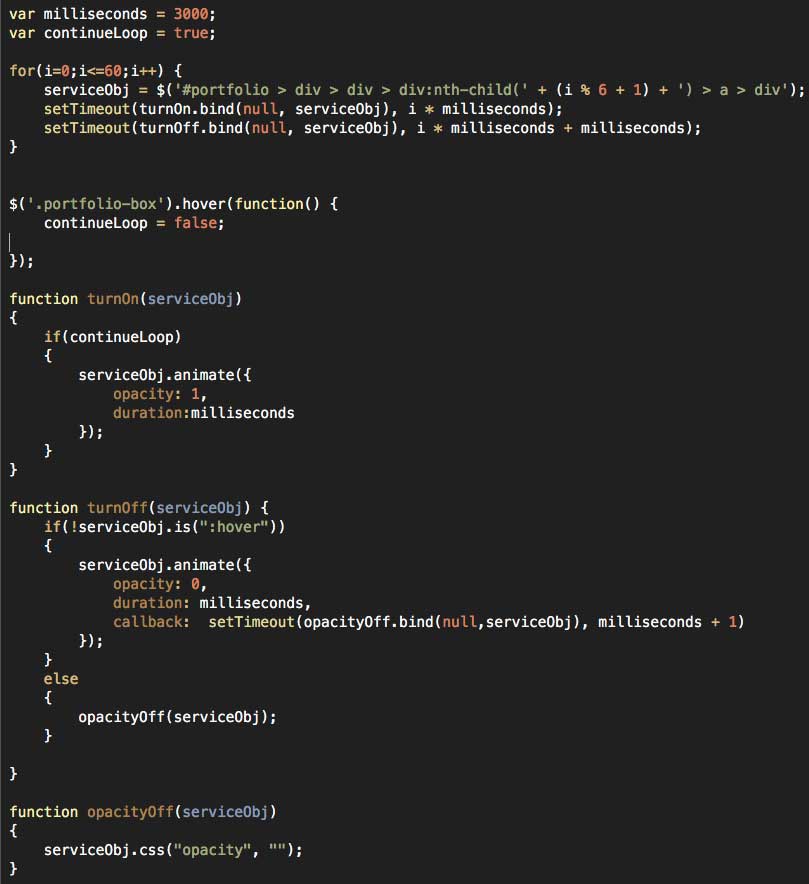
Now I’m going to bullet out some learnings from writing this jank:

  • When dealing with issues of timing in Javascript, you have to remember that the browser is going to rip right through your code, doing all the things you want in a particular timed sequence almost simultaneously. You have to know how to space everything out timing wise, using control loops, timing functions, and the dreaded callback.
  • To help make your life easier, establish your timing variables instead of hard coding them. The way I have written it, I can easily change the amount of seconds the transition takes by adjusting the millisecond variable.
  • One fun thing I learned here was that calling setTimeout with a function that passes variables screws the whole thing up, causing everything to fire simultaneously or just plain not work. Using “bind” apparently circumvents that problem, allowing variables to be passed without issue. Whew.
  • The for loop is set up to basically do 10 (60 / 6 = 10) iterations. To make sure my definition for serviceObj fires correctly, I had to bust out the mod operator so it would remain 1 – 6 regardless of where ‘i’ was.
  • I have an event listener in place for a hover on a .porfolio-box class. When that happens, a “continueLoop” control variable is set to false. This halts the behavior after the visitor has hopefully realized that the boxes are mouse-over-able.
  • I only perform the check for continueLoop in the ‘turnOn’ function. Checking in “turnOff” as well would mean previously lit tiles would stay lit.
  • The ‘turnOn’ function is called every X seconds, where X is the iterative variable multiplied by the millisecond reference variable established in the beginning. The ‘turnOff’ function is called similarly, with extra time built in to account for turnOn’s time needed. Thank you Javascript for forcing me to work on my temporal skills.
  • The ‘opacityOff’ function is meant to remove the inline style that jQuery adds when animating. The original hover behavior from this Bootstrap package relies on changing opacity with external CSS, and since inline styles take precedence over external CSS, the behavior didn’t work unless ‘opacity’ was cleared as an inline style. Once turnOff completes, opacityOff is called to clear the inline style so that hovering still works.
  • If a person moused immediately over the panel that’s currently lighting up, the ‘turnOff’ function was still called, meaning that the panel disappeared even though the mouse was still on it. Not good. Yet another example of Javascript edge cases! Luckily, a quick check for the box NOT being hovered on before ‘turnOff’ is allowed to execute its contents seems to do the trick. This made sure that hovering mid-animation didn’t ruin everything. But of course it also WOULDN’T TURN OFF when the user moused out. So I threw an else condition in the turnOff function for when the box was hovered, setting the opacity to empty which allowed the CSS behavior to take over on mouse out. WHEW.

This was an interesting post for me to write. I certainly had fun with it, but I’m really not sure how much people may or may not be interested in super-geek code style posts. I’ll be keeping an eye on the analytics, so if you liked this, hit the refresh button a few times to inflate those numbers! I promise I’ll work on the lackluster formatting if I see enough interest. 🙂

PS – if you haven’t had a chance yet, check out the “marketing side” of this post.

Progressive Enhancement Post #1

Alright I’m pretty excited to bring today’s post. I’d like to use this category of posts to discuss my approach to progressive enhancement – a term us web nerds use to describe the process of managing and improving a website over time. In today’s post I’ll be using my own site as an example.

The story goes like this: I wanted to establish a blog category on my approach to progressive enhancement. I am a firm believer in letting analytics data determine where enhancements should be made, all tied back to established website goals. I didn’t have to wait very long to spot a concerning trend! As a website owner, you want your visitors to be drawn deeper and deeper into your site. If they are not, it always makes sense to look for bottlenecks and make efforts to remove them.

Case in point, I noticed in my own traffic patterns that while people get to the Services page, they rarely went past the more “introductory” services page. I spent a lot of time pouring over the content for the six individual service pages, so naturally its cause for concern that people aren’t compelled further down the rabbit hole. So with this issue unearthed, I took a look at my services page and attempted to identify potential bottlenecks.

My first thought is to throw the copy right under the bus. Maybe its not that compelling, or my copy is too “sales-y” and not specific enough on what I’m actually offering in terms of services. Though completely plausible, this issue will be addressed in a later enhancement when I am able to set up different variants of this page for testing. If these new service page variants outperform my original here, then we’ll have answered the question “does the copy suck.” Though certainly possible, there may be other reasons …

My second thought is that while its great to have a “graphics grid” with 6 mouse-over-able pictures, that perhaps some visitors might not realize that they are indeed an interactive element to the site, and that I intend for visitors to hover, click, and navigate to the individual service pages. One solution to this problem would be to make the title and subhead appear by default over each image, but that just didn’t seem as fun as what I came up with. It probably makes more sense for you to view it first, so check it out real quick. I’ll wait 🙂

I wanted a subtle “shuffle” effect that would sequentially fade the overlay in over the 6 service offerings images. My thought was that its a subtle enough effect to catch the users eye and let them know there’s more going on here than just imagery. And so as not to overwhelm with too much animation and motion, the second a visitor mouses over an image the whole behavior stops. Its really only there to cue visitors, and once they get that there’s more content, there’s no need to keep it going.

So hey, this might not be the solution to the original problem of people not looking at my individual services pages. But with a quick bit of custom coding, I’ve narrowed the field of potential causes. I am confident that if there are a subset of visitors who don’t realize the images are hover-able, this fix would most likely addresses that issue. Now the only question that remains is was that the actual problem, or do I need to take another pass at the content on the page to make it more compelling? (hint: the answer to this question is always ‘yes’ regardless.) Continuing to monitor the performance of visitors coming to the services page should help clarify the answer now that I’ve hopefully taken the “didn’t know the images were clickable” issue off the table. If I REALLY wanted to be sure, I would treat both pre-treatment and post-treatment pages as variants and split incoming traffic to see if the new page actually compels people deeper into the site for a direct comparison. All that said, since I like the effect, I’m just going to keep it.

In summation for this first progressive enhancement post, this is my approach. Crawl around in the visitor data to see if any interesting behaviors emerge, hypothesize about those behaviors, and make manipulations that serve a dual purpose of improving the site while simultaneously answering some important questions about visitor interaction. A website is never finished, and this kind of approach to the lifespan of your website will ensure you get the maximum value for all you paid for in that costly (re)design phase.

Extra Credit:
I have a follow up post to this one where I talk about the coding side of this solution for anyone more technically inclined.

Send me Your Website Questions!

In this blog post, I’d like to take the opportunity to explore what this consulting business o’mine is really all about. I think of myself primarily as a translator – someone who stubbornly sits on the border of the technical side of the web and the marketing side. Calling myself a “website guy” encompasses nothing less. Acting as a go-between for both fields provides some serious opportunities as I find people are usually strong in one but not the other. At a point in time where the wall between them is shrinking every day, website owners NEED someone like me who facilitate communication between both sides.

So moving forward, I would really like to do these kinds of posts where I answer digital questions specific to people’s context – be they marketers attempting to get the most out of technology, or technologists looking to understand marketing themselves or their products better. So I encourage everyone to submit any question they have and I’ll see what I can do. If its website related, either I know it, or I want to know it. So without further ado, here is the first Q&A style “web chat” post.

Mike, a web and mobile expert dealing primarily with metered paywall based magazine websites, asks a very simple and straightforward question that all small businesses are currently mulling on: How do I get more sales? My answer for Mike’s specific context goes as follows:

Mike,

I took some time to think about your question regarding acquiring more sales for the past few days because I’m in a very similar spot. Our situations are somewhat alike in that we are both young businesses, so it was pretty helpful exercise for me too!

You’ve already taken the first step I would have recommended, which is to pick a specialty area. I understand that you are specialized in issue-based magazine websites that use metered paywalls. I’m also going to make a guess that you deal primarily with WordPress, which makes the next step that much easier.

What I would recommend for you is a WordPress specific theme and / or plugin for metered magazine websites that you & your team author. You are your own client here, which I know can be challenging, but I think its worth it. Here’s why.

The benefits of this approach are many.

  • First off, websites that use your plugin should count as a backlink and will pass off some SEO “link juice” over to you (you may already be aware of this trick.) Having one of the “go-to” plugins for running a magazine style website within WordPress will work wonders for your organic ranking within Google. On the SEM side, the specificity involved here will really let you focus in on some high performing long-tail keywords, and your landing pages should practically write themselves. This level of specificity will make it easier for you to compete with the big guys.
  • Second, it gives you something more concrete to market. Its easier to sell a tool you have been developing that encompasses all the learning you’ve done in your time working in this specific niche. It would be compelling to me as a magazine style website owner to know that the software I am acquiring reflects the learnings from other domains that use your software, especially if you have performance numbers to back up your claims. It also gives you something to demonstrate in your one-on-one sales meetings rather than just TALK about how good you are in this particular area.
  • Third, you get a unique opportunity to craft the software in a way that not only reflects your unique style and capabilities, but also gives you a baseline product to impress your clients with right out of the gate. Why start with nothing in every client relationship when you can deliver early value right in the beginning? Then there’s an upside for you in the duration of the relationship as well. It simplifies the service questions – from “how can I help them” to “how can I modify my tool to help their specific context even more than it already is?” AND, if the further modification would help your other clients / subscribers, you could easily adapt and abstract the new feature for more generic use.
  • Fourth, you could build your own magazine style website that demonstrates what your software tool can do for potential clients. It can be as real or as fake as you want. Its a sales tool. You will be able to take more liberties with your own magazine site versus one of your client’s, so this will be a testing ground of sorts. And who knows, if your magazine site became popular, another source of revenue never hurt anyone!
  • Fifth, a software package can be scaled where a business that revolves around servicing clients can’t be scaled easily. If your web-solutions business takes off, you may find it especially difficult to maintain the organization you enjoy now as a smaller business. Once these organizational cracks start to show, you’ll realize you’ve hit a ceiling of sorts. While software certainly has its own set of scaling issues, its my belief that they are easier to manage and happen further up the revenue chain – i.e., software scaling issues are usually cause for celebration!
  • Finally, there’s nothing stopping you from acquiring work outside of this niche, just think of this as where you will apply most of your marketing effort towards. Once you are comfortable that you have a marketing mix that sells your product to the utmost, you can then revisit this very strategy for other areas of competency, like perhaps adapting your software for ad revenue specific magazine sites versus metered.

I hope this helps, Jay! I know the exercise was certainly helpful for me to think through. If you have any further questions, just let me know!